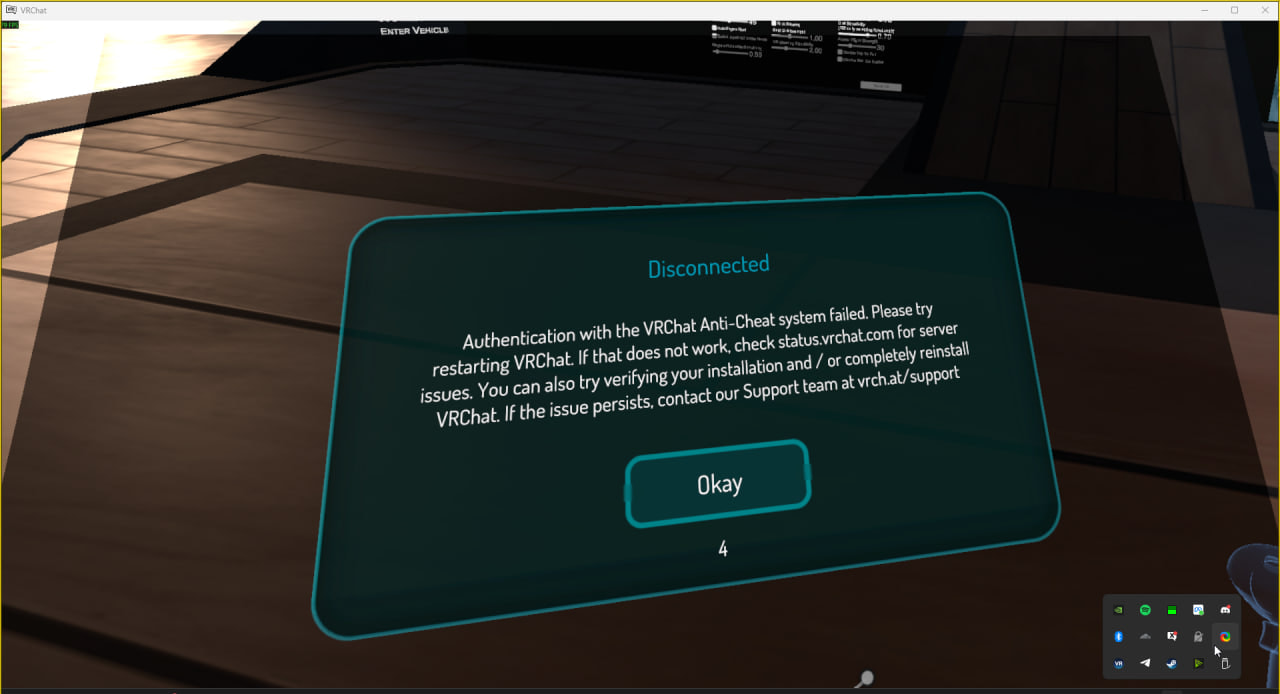
Hi! I have seen numerous others post about this issue but I hope posting it here will get the VRC team to fix this. Ever since the last few days of VRChat having connection issues/etc EAC has been really wonky lately. Crashing me in servers with errors like this
Is there a proper fix for this? Why is this happening to so many? The only thing that I’ve tried which seems to be working is, deleting EAC and then verifying my VRChat files.
If this keeps happening often, i had a similar issue a year back and this helped me. Granted this is a nuclear option and should only be done if you’re comfortable with using terminals. It’s also not an official fix, but was the only fix for my issue which had the same error.
Click Windows key / button to open the start menu. Type cmd, right click and Run as AdministratorCareful to not type in any other commands as it starts in your System32 folder .
In the Command Prompt window, type exactly: cd "C:\Program Files (x86)\EasyAntiCheat_EOS" (including the quotes) and hit Enter
You should now be in this folder as you can see on the left.
Run this exact command: EasyAntiCheat_EOS.exe qa-factory-reset
There is no confirmation after it runs, but you can type echo %ERRORLEVEL% and if it says 0 it worked. This will completely factory reset it and VRChat should re-run setup on next launch.
This happened to me the other day. One specific instance was only affected. Everytime I’d try to rejoin that instance, I’d get flagged for “changing instances too quickly” (not the exact popup word for word but it’s still new to me), then it would toss me in a friends only instance by myself, which is usually what would happen if you were banned from joining public instances back in the day. Sometimes it would toss me in the error world.
I chocked it up to be someone abusing their powers or some malicious user.
I kept having that issue only until I joined off of a friend from an invite request rather than joining the instance via “join instance”. Which got me in instantly without issue
I also checked the logs, and I got some funky text which lead me to believe mal intent. I already reported the issue under an alt account (doesnt mean too much when the logs have my name, which I could just edit out) because I got a little schizo. Mods have abused their powers in the past so
Btw I never reset my EAC or reinstalled anything because I knew none of my files had changed and knew none of the files were corrupt either. All problems went away for that singular instance after joining off of a friend