-– I apologize if my English sounds unnatural, as I am not a native English speaker. —
I have a question regarding the UI Slider used in a VRChat world.
[ Current Issue ]
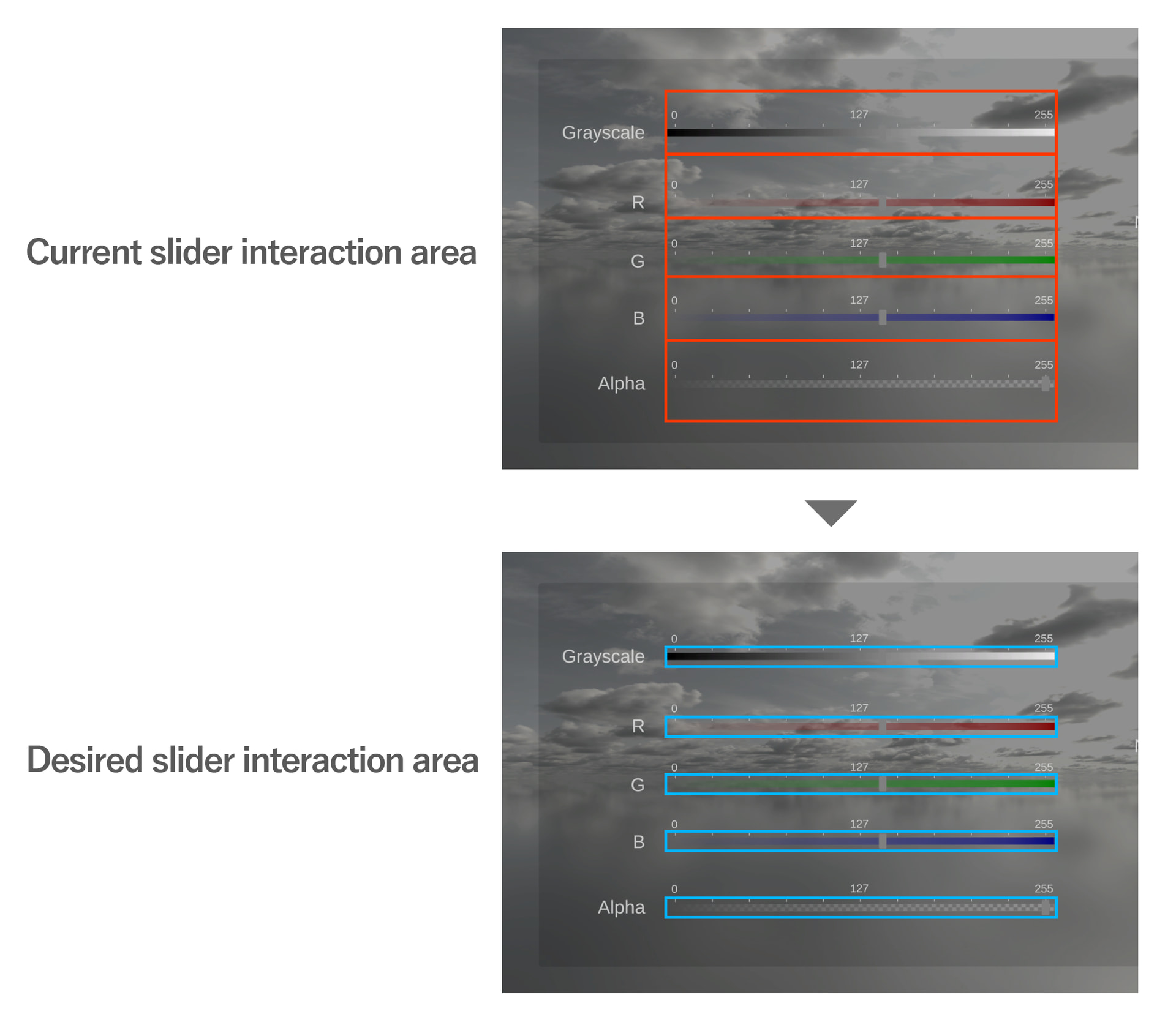
As shown in the top image of Image 1, the interaction area for each slider extends too far vertically. In addition, the interaction areas of neighboring sliders are not independent, so when I try to operate one slider, I sometimes end up moving the slider above or below it unintentionally.
[ What I Would Like to Achieve ]
I would like to adjust the pointer interaction area of the slider to an arbitrary size.
Specifically, I want the interaction area to match the visible slider, as shown in the bottom image of Image 1.
[ What I Have Tried ]
I initially suspected that the large interaction area was caused by the Handle rather than the Background.
To test this, I tried the following:
- Resetting the Handle’s scale to (1, 1, 1)
- Reducing the size of the green interaction area by adjusting the Handle’s Raycast Padding.
However, neither of these changes solved the problem.
[ Additional Information ]
The slider is implemented with the hierarchy shown in Image 2. If I remember correctly, it was originally based on a UI asset from Booth that I later modified extensively.
If anyone knows what might be causing this behavior or has any suggestions, I would greatly appreciate your advice.