Welcome to the Developer Update for October 8, 2026.

Today’s featured world is Autumn Fragrance by _harim.
Announcements
Legally Distinct Ink-tober #VRCtober26

While you’re waiting on more Spookality news (and trust us, we’ve got a lot of it…) we have something to tide you over: VRCtober!
It’s something for those who didn’t make a World or Avatar for Spookality this year!
Submit VRChat photos, music, pencil on paper doodles of your avatar, 3D art, mini skits, whatever you’d like! Favorites will be shared on socials. Use #VRCtober26 so we can find it.
What Are Your Thoughts About AI in VRChat?
First: please do not throw your comments about this topic in this thread. Take the survey here!
If you want to read everything we wrote though (and it is a lot about a complicated subject) please check it out here.
This is an important topic and we really want to hear from you.
Indonesian Language Support!
Selamat malam! What are you doing up?!
Indonesian is now available as a localized language in the VRChat menus :3c

Introducing the Safety Center
Soon, there will be a new section in the UI: the Safety Center.
The Safety Center is the visual part of something much larger. In short, we want to do a handful of things:
- Make sure folks that are actioned by our Trust & Safety team have a better understanding of why.
- Have punishments that better fit the “crime,” so-to-speak. Think “feature level” punishments as opposed to “account level” punishment.
While we won’t provide precisely what punishments match each violation, think of it like this:
In the past, if someone had an avatar-based violation they would receive an account suspension.
Now, they would receive a temporary restriction relating to being able to change into or use certain avatars, but their account would still remain accessible.
Here’s what the Safety Center will look like:


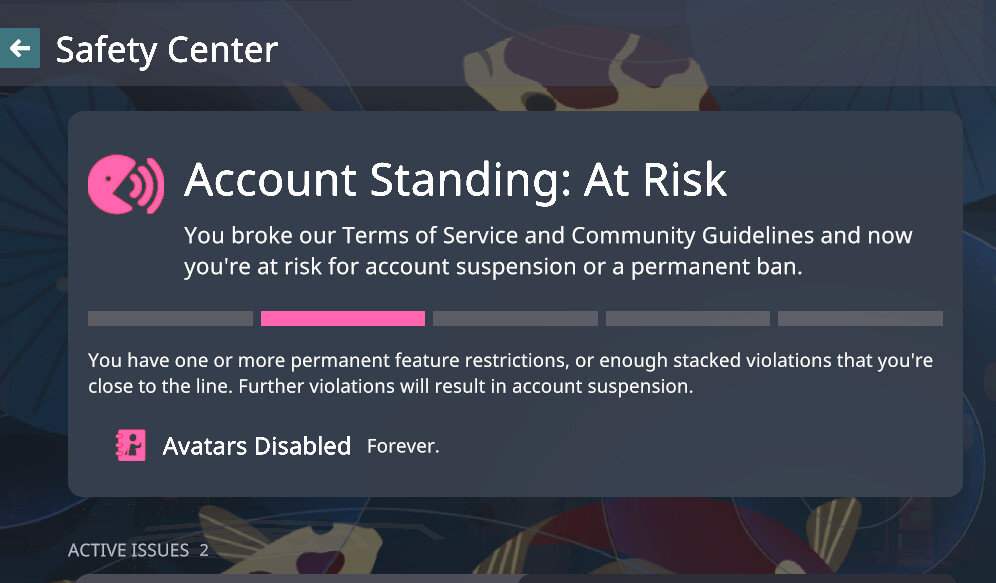
(Please note, these punishments are for show/testing. Don’t read into them too much.)
This will let users see if their account is in good standing, if they’ve received an infraction in the past, or if they have a current limitation on their account.
You will also be able to appeal certain infractions from the client, including if you were suspended. In that case, you’ll see the Safety Center before loading into any VRChat world.
Steam Frame Standalone Improvements
We recently worked with Valve to resolve a SteamVR/driver issue that was making standalone GPU performance way worse than expected in VRChat.
The fix is currently available in the Steam Frame OS beta release channel, and should make it to Stable soon.
This fix should greatly improve standalone performance on the Steam Frame – if you have one (growls, spits, roars, slashes, meows, good for you, etc), you should test it out.
Synced Parameter Interpolation
When you control a synced avatar parameter using a puppet control, such as a radial in the expressions menu, that value currently changes instantly for you locally, but interpolates over time for everyone else.
This means for example that a blend shape controlled by a synced parameter will appear to move smoothly to its target when viewed remotely.
We’re considering making changes to expose the interpolation time as an adjustable value for each parameter instead, which would make it consistent between local and remote users and allow the avatar author to create parameters that gradually move to their target value over time rather than moving instantly.
This would mostly be relevant to float parameters.
Between this, parameter bit widths and name mapped parameter buffers, you may have noticed that we’re working towards some fairly fundamental changes to the way synced avatar parameters work.
We don’t expect any significant effects on existing avatars from these changes, and we’re aiming to combine them all into the same release to avoid having to make multiple network incompatible releases in row (assuming everything goes well).
If you’re an avatar creator with opinions about these planned changes, we’d like to hear from you!
Do you feel these changes (particularly the considered changes to puppet networking) could cause issues with your avatars? Please let us know how you feel in the comments.
Voice Audio Rework
A while back we showed you some previews on our reworked voice audio implementation. This project has been going on in the background, and is now starting to take shape!
Over the past month, we have reached the initial feature-complete stage across all supported platforms.
This was a bigger effort than you’d think: Audio soft- and hardware is some of the most finicky engineering to work with, especially on mobile devices like iOS and Android.
Additionally, we’ve been testing the new implementation thoroughly across real-world scenarios, including in small and large instances, music events, and complicated Udon worlds.
The goal hasn’t changed: Voice is fundamental to VRChat, so we want it to work well, while getting out of your way.
There’s a few new settings, such as a less aggressive Noise Cancellation option, tunable Automatic Gain Control, and better Noise Gating variants.
But overall, the aim is to ship with good defaults that will result in a better voice experience out of the gate.
For those really tied to our old methods, some “Legacy” options will remain to preserve existing behavior of individual components in the stack.
Behind the scenes, this is a major rewrite of everything that makes up Voice: Networking and handling of bad network conditions, recording, buffering, performance, multi-threading (yes, that means in-game stutter, such as heavy avatars loading in, will no longer cut out voices or drop your speech data), pre- and post-processing, encoding.
A lot of this will be invisible, but all together hopefully result in less audible issues and bugs.
As a final gift, here’s a fun recording: We needed a way to “seed” our VAD and AGC implementation on startup, which is best done by quietly feeding it some audio containing a variety of voices.
So we asked the team: Submit a quick recording of you saying “Hello”, and we’ll combine it into our voice-seed. I can’t stress enough that the objective was to say “Hello”. Anyway, here’s the VRChat team saying “Hello”:
VRCRaycast Trigger Detection
We’re working towards an update for the VRCRaycast component that will allow it to hit trigger colliders. This is being implemented as a new version option on the component to protect potentially changing how existing content behaves.
The new version of the component, 1.1, will make these changes:
- A new Collide With Triggers toggle is added, allowing creators to configure whether or not rays can hit trigger shapes. For comparison, version 1.0 of this component never hits triggers.
- The Result Transform no longer has to be assigned for the component to function – it sets its parameter regardless of whether it has a transform to apply its result to, so now you can have an invisible raycast that just emits parameter values without needing to assign a useless empty result transform to it.

The Collide With Triggers option is required for the ray to be able to hit players that are not you (more specifically, the Player layer), which leads us onto our next change…
Remote Player Collider Changes
In a future update, we’re planning to change the physics collision shape on remote players to to match that of the local player. This means that Udon events like OnPlayerTriggerEnter() will trigger more consistently between the local player and remote players.
This is also part of the fix for VRCRaycast above, since without this change, rays from that component would only hit the sphere around the feet of other users which wouldn’t be very intuitive for avatar creators.
Here’s the existing remote player collider, which is a sphere around the user’s feet:

…and here’s the new collider planned to replace it, a capsule matching the local player:

This change has a chance of affecting existing worlds that make very specific assumptions about the shape of remote player colliders.
In practice, we feel that the most common use cases for world triggers in VRChat will be unaffected (room transitions, lobby areas for game worlds, and so on), but do let us know in the comments if you have a preference for backwards compatibility and what your thoughts are!
Deja-vu? We last mentioned this issue in another developer update from three years ago. This change has new relevance now since we’ve introduced VRCRaycast for avatars.
Conclusion
And that’s it for this week! See you in a few weeks.
