Developer Update - 13 August 2026

Welcome to the Developer Update for August 13, 2026!

Today’s featured world is 忘郷 by enoki_noko.

Announcements

Big Things Coming: Moonchaser!

On August 28, we’ll be hosting our own music event: Moonchaser! This is the month of eclipses, apparently, so we’re celebrating.

We’ll have more information soon, so keep an eye on our socials.

2026.3.1 is Out!

It’s a big one: this release updated the User Profile, Nameplates, and added Profile Decorations.

You can read the notes here.

Or, just watch me yap:

We know folks have feedback – we’re addressing as much of it as we can! We want to make it clear we intend to continue to iterate on this design.

We actually have an update that will be coming out (very) soon. It might already even be out when this goes out… so uh, if it is, awesome. If not, soon?

(strasz update: it came out. yay! we’ll have more, likely.)

SDK Updates!

Billboarding… But Make it Performant

As a world creator, you may have found yourself in need of a way to make an object always face the local player, sometimes called Billboarding. Doing this with transforms requires update loops in Udon, which are expensive. We’re adding native support for this to make it easier and more performant to implement!

Three new methods will be available!

(Note: always subject to change until release!)

VRCBillboard.Register(Transform target); // upright, tracks yaw only (side-to-side)
VRCBillboard.Register(Transform target, bool allowTilt); // allows up-and-down pitch changes as well
VRCBillboard.Unregister(Transform target); // cleanup is automatic but can be triggered manually

Easier Avatar Bone Tracking

Currently, if you want to attach an object to a bone on someone’s humanoid avatar, you have to manually move and rotate the object every frame to follow the bone, like this:

void Update()
{
    Vector3 pos = Networking.LocalPlayer.GetBonePosition(HumanBodyBones.Head);
    Quaternion rot = Networking.LocalPlayer.GetBoneRotation(HumanBodyBones.Head);
    transform.SetPositionAndRotation(pos, rot);
}

This works, but it’s a little inconvenient since again, update loops like these can be expensive in Udon.

We’re planning to add native support for this as well, so you can attach a transform to a bone on a user’s avatar by doing something like this instead:

Networking.LocalPlayer.AttachTransformToBone(transform, HumanBodyBones.Head);

You only need to do this once – after the transform is attached, VRChat handles tracking the bone for you. If you need to remove it again later, you’ll be able to detach it by doing this:

Networking.LocalPlayer.DetachTransformFromBone(transform);

Advanced Contact Proximity Parameters

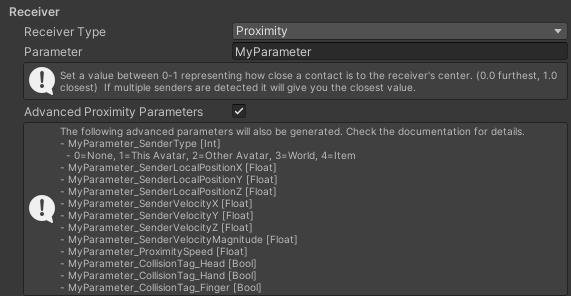
When a contact receiver is hit by a contact sender with at least one matching tag, it can generate a “proximity” parameter for the avatar’s animator that indicates how close the sender is to the center of the receiver (or optionally to a face of the receiver if it’s a box).

In an upcoming SDK update, we’re planning to intoduce several more parameters to give more info about the contact. These include:

  • A “sender type” parameter that identifies what kind of content the contact sender belongs to.
  • The local position of the middle point of the contact sender relative to the contact receiver.
  • The velocity and speed of the contact sender relative to the contact receiver.
  • The rate at which the proximity value is changing.
  • Up to sixteen Boolean parameters, one for each tag the receiver uses, to indicate which tags the sender has in common with this receiver.

If multiple senders are in contact with the receiver at the same time, the values above will represent the sender that has the highest proximity.

These are being planned in response to community feedback surrounding a need for this info and the potential to improve the performance of existing avatars by eliminating complex work-arounds used to derive this info in other ways. Thanks to everyone giving us feedback!

Here’s a quick preview of the inspector. As always, this feature is still in progress and subject to change!
Soba!

Sorry, just wanted to jumpscare you with that header.

We’re still working our way to a Closed Beta. The language itself is in good shape. We’ve got non-behavior classes, structs, interfaces, static variables, nested types, custom interfaces and exception logs that include a full stack trace of user code.

The biggest of those is classes that don’t inherit from a behavior. In Udon, every piece of code has to live on an UdonBehaviour, so your systems are shaped by the GameObject hierarchy whether or not that has anything to do with the problem you’re solving.

In Soba, you can write plain classes that hold your data along with the logic that operates on it, pass them between SobaBehaviours, and touch the scene only where your code actually needs to.

What’s left is the part that doesn’t demo well. We’ve built a lot of Soba quickly, and we’re now going through it feature by feature to confirm that what’s implemented actually works in a real client and is fully covered by tests.

That pass is turning up gaps, which is what it’s for, and it’s where most of our time is going right now.

Alongside that task: editor tooling, validation, error messages, and documentation.

A Closed Beta is only useful if the participants can actually build things with it, so we’d rather finish that first. Soba is designed to sit alongside Udon, not replace it. We’re not putting a date on Closed Beta here. In March, we said we were hard at work getting it ready, and that turned into five more months.

We’d rather under-promise than do that twice, but we nevertheless wanted to provide an update of some kind.

Fixing Accessory Bugs

We’ve been tackling a lot of small bugs and improvements here and there for Accessories but one worth highlighting is a new dropdown list to select which bone you want to parent an accessory!

This list allowed us also to now support non-humanoid bones, which are usually common on more complex avatars like quadrupeds and others that have some interesting mechanics.

If you want to change which bones are displayed in your avatar preview when the dropdown is open you can toggle the eye button between Humanoid (only humanoid bones), Rig (non-humanoid bones that are parented to a humanoid bone) and Extra (non-humanoid bones that aren’t parent to a humanoid bone).

Website Performance Rank Consistency

We’ve shipped an update to vrchat.com/home which makes the avatar performance ratings displayed on the website more closely match what you see in the VRChat client.

You should see fewer unexpected “Security Checks Pending” results, as previously it would sometimes choose the wrong version of the avatar to display the performance rating for. It is now using identical logic to the VRChat client!

A Little Note on the Trampoline

We’ve gotten a few questions on the Trampoline. So we wanted to address them:

Hey, the Trampoline is exclusive to VRC+ for more than August. What gives?

You’re right! Some of our Items this year will be VRC+ Exclusive, rather than the Monthly Drops we’ve been doing.

What’s the difference?

VRC+ Exclusive Items are Items that will stay in your Inventory as long as you have VRC+, similar to the VRC+ Exclusive Warp Effect and Warp Tunnel Loading Screen. No need to rush. These are always available when you have an active VRC+ subscription.

VRC+ Drops are Items that are only available to VRC+ subscribers during a particular time frame. This is what the majority of the VRC+ content has been so far.

In other words, we plan for VRC+ to get either a new Exclusive or a drop each month.

Why one over the other? We’ll still figuring that out.

Conclusion

That’s it for this time. See you in two weeks!

13 Likes

"Website Performance Rank Consistency"

I would LOVE a way to view avatar performance stats via the website, rather than just the overall rank!! Would be especially useful for those that are PC only, or quest only to view their stats on other platforms and compare without having to be ingame on that platform! <3

18 Likes

REALLY excited about the SDK changes! More performant ways to do both billboarding and bone following are very cool to see. These will be great to make a good handful of Udon things a lot less tedious.

5 Likes

Billboard is cool. Some of those other features are pretty cool too.

This is exciting, but what does this look like from an Udon Assembly perspective? More native support for things is great, but it feels a bit useless if I still need to do a bunch of EXTERN calls to do basic math. Currently, usually what would run just fine on C# in Unity runs like garbage in Udon, especially when I have no way to profile the performance of Udon reliably.

It’s a bit exhausting trying to be creative with Udon when I have to constantly debug and profile it without proper debugging or profiling tools, and write it in a very strange way compared to standard programming practices just to reduce EXTERN calls.

It feels like if you want to really make good things with Udon, you need to have had a decade of programming experience in low level languages. It’s just very frustrating as someone who sees programming as a means to an end, and finds it frustrating when quirks and nuance get in my way.

Also, if I can be 100% honest: It’s garbage like this that has been making me turn towards using LLMs to code. But ironically, despite a lot of success in that regard, even Claude is confused at times about how Udon works because it’s used to many other programming paradigms.

UI

I never got a chance to see the UI in beta, so I unfortunately never made feedback requests about it. But now that it’s in live, I have some words:

By the way, small side note: It’s a bit frustrating that if I do cancel VRC+ because I’m financially strained for a month or two, that I need to go back and re-enable/configure all of my VRC+ things. It functionally works as a mechanism to keep me paying, since I don’t want to deal with that.


TL;DR: There are some changes recently that make it feel like talking to a brick wall. It hurts when it feels like I’m being told what’s good for me, and my actual concerns and feedback are falling on deaf ears.

4 Likes

This is a good start. I believe there’s a tremendous amount of things that could be streamlined like this in Udon to make it more friendly, avoid boilerplate and reinventing the wheel. We need more building blocks both for the beginner users and advanced ones who are tired of repeating things or having to remind themselves what is the best method to achieve X

4 Likes

Will the new “Attach to Bone” feature account for culled avatars? Hidden avatars? Imposters? Fallbacks? Will the attached object continue to use the user’s Avatar’s correct bone orientation for everyone in the instance regardless of those inconsistencies? What if a remote user hides someone’s avatar while that player has something attached to a bone, will the object randomly rotate to some new bone rotation, or will it remain in the consistent expected rotation?

Because if this new system won’t account for all the issues that are currently associated with bone tracking for remote users, then this update will be significantly less exciting for me, unfortunately.

What would be significantly more useful would be to also have the option to attach bones to a remote user’s “TrackingData”. That way, I can choose to ignore all of those issues if I specifically want to track someone’s head or hands regardless of their avatar, visibility, etc.

7 Likes

In July VRChat did a video about some tools to prevent toxicity. Any update on that ?

Good Start.

Can you do something about SDK’s “Build & Test” spawning broken VRChat windows that you can’t close. It’s essential part of world creation and it’s been broken for long months now. It’s especially frustrating when you iterate frequently

2 Likes

I’ve had unpleasant experience with the bone tracking methods as well. Things just rotated completely differently on remotes. Feels like a basic functionality that shouldn’t require so much tinkering with. This is one of many aspects that make Udon and world creation just annoying. Staying in the loop of all these little annoyances and how to remedy them

1 Like

As the update above demonstrates, this is intended as a more convenient and performant but otherwise one-to-one replacement for tracking a bone on an avatar using a transform owned by the world. So the cases you’ve mentioned should work the same way as the Update() loop demonstrated above. I agree that inconsistent bone rotations on avatars can be a bit of a challenge!

Please feel free to leave more feedback on our feedback board if you feel it still needs improving further! The API as implemented here is based on related feedback we received on Canny.

It has genuinely been one of the most stressful parts of world creation for me. As soon as I’m able to access remote players’ TrackingData, either with this new feature or some other new SDK method in the future, my life immediately changes completely. Hopefully VRChat recognizes how significant of a feature that would be for the landscape of the platform as a whole

2 Likes

I posted about this exact issue months ago on Canny, and that post has received absolutely no attention since then lol

I agree. Movement and tracking is essential for VR apps and having such a basic function acting this way shouldn’t be the case. This is one of the many annoyances that made me stop working on one of my projects. It just gets tiring having logs thrown under you at such basic levels

4 Likes

Edit: Apparently it was mentioned that the upload flow for this will be updated later in the video, but it was not mentioned in this dev update. This now makes me think that there is a mountain of things I’ve missed in the past few years because I didn’t watch the video, since I prefer reading blog posts :slight_smile:

Why wasn’t the upload flow released alongside the banner update? That seems important.

I think it would be really, really cool if VRChat used the notifications in-game to release patch notes that users can easily read, which cover everything that was changed or planned to be changed.


Oh yeah, by the way, can we get the official version of this posted somewhere? Ideally it should just live on the website alongside the “Update Group Banner” button. Please and thanks.

1 Like

Here are some associated Canny posts:

soba being alongside udon makes soba redundant, no? both are slow sandboxes with no practical full c# ability, and is just an extra maintenance burden which has bitten vrc before with the prior layoffs. why not focus on extending and optimising the abilities of u# to have one good system, rather than two janky systems?

i feel the ui update should have stayed in beta for longer also. i cant disable animations without disabling all menu animations. thats bad design, and has been a complain with discord profile effects since they released, and the plethora of incomplete cannys still marked as incomplete.

as a side note with the sdk changes though, when will the item sdk finally release? its been quite a while since we’ve heard anything, and theres lots of people still waiting for its release. a verified creator only store is a sure fire way to kill it on release

2 Likes

Also, to clarify, it’s not “for those use cases, use the Update() loop”, it’s “those use cases are currently impossible.” As the cannies mention, you cannot reliably track TrackingData of remote users. At all. This has been a major issue for years

2 Likes

Anything to address about the ever-increasing unread notification bubble for the Inventory on the website that I can’t figure out how to clear?

4 Likes

SO EXCITED FOR THIS. OBJECT TRACKING!!! And between avatars at that even! So many cool shader things will become significantly less performance heavy with this!

One thing I would really be interested in seeing would be an option for this to return world space position. Local space xyz is good, but it means you are bound by the constraint size limits, and you need one receiver for each differently positioned object. If we could return world space, then for shader stuff you can just stick a receiver in a sender and move around both wherever, and always get back the world space position.

Made a little diagram here with green receiver, blue sender, black to show the vector returned in those parameters, purple to show the vector once transformed in the shader from world to each object space and red object to show this.

The basic idea is that for tracking objects on your own avatar, the world space version is much more flexible for shader stuff because each object already knows its position relative to world space.

(Also slight typo on “introduce” in the second paragraph.)